
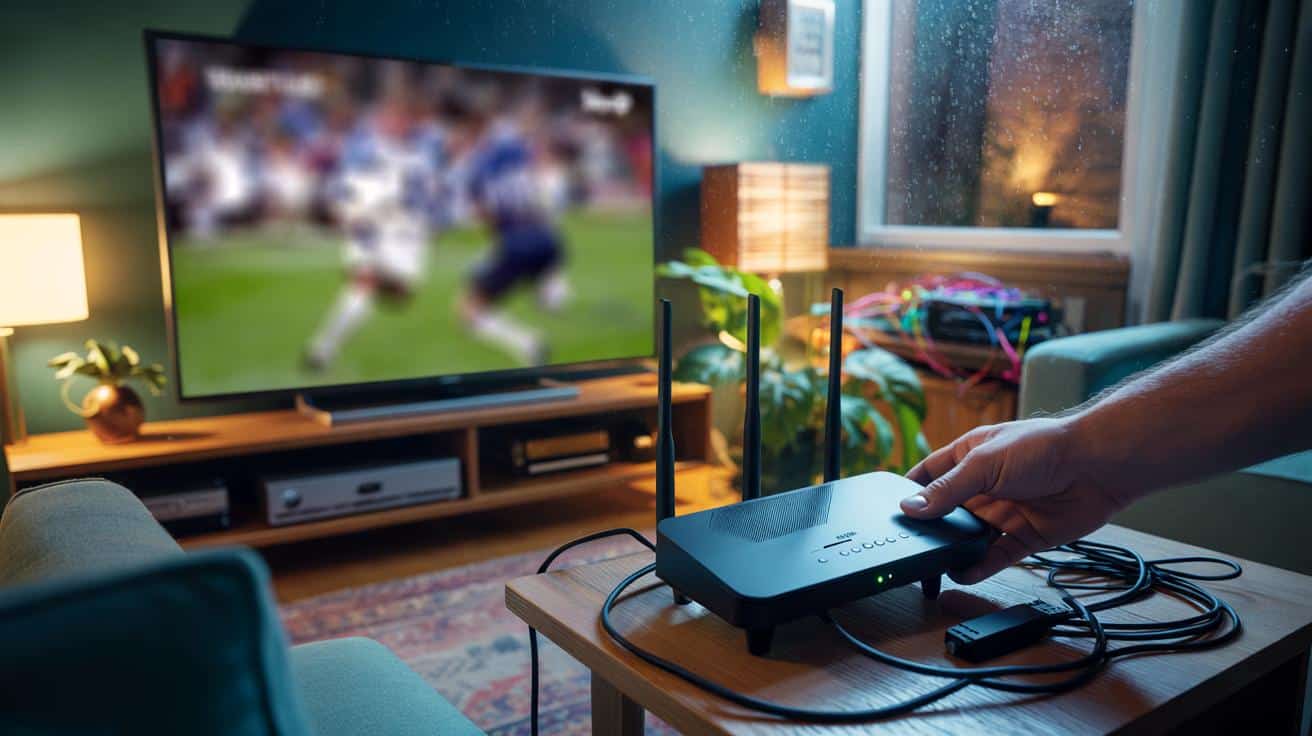
The villain often sits right next to your entertainment, quietly smothering your signal.
Tuesday night in a small flat, rain on the windows, a pasta pot steaming away. The match is on, the group chat is ruthless, and the live stream keeps coughing itself into a pixelated mess. I glance at the router squashed behind the TV, wedged between a soundbar and a stack of old DVDs, cables looping like ivy. I slide it out by a hand’s width, past the black edge of the telly, until it clears the furniture by something like 25 centimetres. The picture sharpens. The soundtrack stops hiccupping. My phone loses its temper too — in a good way. Pings fall, pages pop open, the living room breathes out. *Yes, inches matter here.* I try not to grin at a small, silly victory that feels oddly huge in a tired week. Ten inches.
Why your TV is quietly choking your Wi‑Fi
Look around British living rooms and you’ll spot the same layout: router tucked behind the telly, out of sight and out of luck. That sleek screen is mostly metal and electronics, a big reflective slab right where your Wi‑Fi is trying to radiate. Add a nest of HDMI leads, consoles, and set‑top boxes humming away, and you’ve built a little storm of interference in the corner. Move the router just a bit and the air clears. It’s boringly simple. It works.
Last month in Manchester, a friend blamed their provider for lag every evening. Their router lived under the TV, almost kissing the back panel. We pulled it forward the width of a paperback — about 10 inches — and rested it on a small plant stand. The buffering eased before our tea had cooled. No app wizardry, no new kit, just a gentle nudge that freed the signal from a metal wall. The sigh of relief was real, and a little daft, like losing a splinter you’d been poking for weeks.
Radio waves hate clutter and love space. At 2.4 GHz and 5 GHz, your router’s signal reflects off big flat surfaces, gets soaked up by cables and cabinets, and tangles into itself. A TV acts like a giant RF mirror, bouncing energy back at the antennas and creating messy echoes that your devices have to untangle. Plus, the electronics in that entertainment stack can leak noise, particularly from poorly shielded HDMI leads or power supplies. Shift the router out of that near-field pocket and it stops fighting nearby metal and noise, so packets sail rather than stumble.
The 10‑inch move: a tiny shift, a big lift
Here’s the quick fix: pull your router at least 10 inches (about 25 cm) away from your TV, soundbar, and console stack. Give it a little breathing room on all sides, not half‑hidden behind a cabinet lip. Lift it off the floor by a shelf or two. Angle the antennas upright if you have them, like bookends rather than bunny ears. Keep it clear of tangled power bricks and coils of HDMI. Reset nothing. Change nothing. Just move it. **Move it just 10 inches.**
You’ll be tempted to tuck the router back where nobody sees it. Don’t. Hiding it in a cupboard or pushing it flat to a wall is a quick way to flatten your speeds again. We’ve all had that moment where we tidy first and think about the consequences later. Try a small stand, a floating shelf, or the edge of the TV unit, front and centre. If the cable’s too short, a cheap longer Ethernet lead is worth it. And yes, there are apps to scan channels and map interference, but let’s be honest: nobody does that every day.
When I asked a broadband installer what fixes most “lag” complaints, he shrugged and said the quiet bit out loud.
“Get the router away from the telly, even by a handspan, and half the trouble disappears.”
- Pull the router 10–20 inches from your TV or metal surfaces.
- Keep it off the floor and out of closed cabinets.
- Avoid stacking it on consoles, set‑top boxes, or power bricks.
- Route HDMI and mains cables away from the router’s antennas.
- If you cook and stream, keep a clear metre from the microwave.
Small shift, real‑world wins
Wi‑Fi feels mysterious until you see how physical it is. Distance, height, angles — the things you can change in under a minute — shape the invisible. Share a photo of your router shelf with a mate and you’ll get a dozen “try this” replies, all from people who once sat on a buffering sofa too. And that’s the real trick: not buying a flashy new box, but letting the one you’ve got breathe. **Your TV is a giant RF mirror.** Give it space, and the room changes vibe.
In terraced houses and new‑build flats, we cram everything into one entertainment corner. That corner becomes a small radio jungle. Pulling the router forward breaks the jungle up. Your phone roams less. Your laptop clings to the signal better in the kitchen. Your console’s updates stop dragging on forever. It’s not witchcraft. It’s geometry and a pinch of common sense. **Small shift, big lift.** And if your neighbour asks why your stream stopped stalling, tell them the truth with a smile: ten inches and a bit of nerve.
| Key point | Detail | Interest for the reader |
|---|---|---|
| Keep the router 10 inches from the TV | Reduces reflection and electrical noise from the screen and cables | Smoother streaming and fewer dropouts without buying new gear |
| Raise and clear the router | Place it off the floor, away from cabinets and power bricks | Better coverage to other rooms and a steadier signal |
| Mind nearby “noisy” devices | Steer clear of microwaves, fridges, fish tanks, and thick bundles of HDMI | Less interference at peak times, more reliable video calls |
FAQ :
- Why 10 inches? That small gap pulls the router out of the TV’s near field, where reflection and electrical noise are strongest. It’s a practical, easy distance most homes can manage.
- Which object should I move away from? The TV and its stack (soundbar, set‑top box, consoles). That cluster is a metallic, cable‑heavy zone that quietly beats up your Wi‑Fi.
- Does this help 5 GHz and 6 GHz as well as 2.4 GHz? Yes. Higher bands are even fussier about obstructions and reflections, so a little space often brings a visible lift.
- What about microwaves and fridges? Keep a healthy gap. Microwaves leak broad noise when running, and big appliances are metal boxes that block and reflect signal.
- Can I leave the router behind the TV if I use Ethernet? If every device is wired, fine. For Wi‑Fi devices, the 10‑inch shift still pays off, even if one console is on a cable.







Moved my router off the TV unit by about a handspan and the evening stutter just… stopped. I thought my ISP was the villian; turns out it was the telly’s metal backside. Speeds aren’t higher on paper, but pages pop and the stream no longer coughs. Honestly, boringly simple fix. Wish I’d tried this last month.
Is there any data behind the “10 inches” rule of thumb? Like before/after RSSI or throughput tests, or is this mostly anecdotal? Not trying to be snarky, just curious.